
SUPPORT
GETTING
STARTED.
Did you recently download EQUINET? Here is everything you need to get started.
SUPPORT FOR
Horse owners
Farriers
Horse care teams


EQUINET is the horse care app for owners, farriers and every horse’s care team, built by Mustad Hoofcare. Owners keep each horse’s complete care history, farriers run their business, and everyone works from the same record. EQUINET puts it all in one place: horse profiles, contacts, horse entries (visits, notes and photos), appointments with SMS and email invites and RSVPs, inventory with low-stock alerts, shopping lists you can share with dealers, invoicing with Xero and QuickBooks sync, team collaboration, and the new Voice Auto-Fill, which lets you describe a job out loud and have AI fill in the horse, procedures, products and notes for you. It works on phone, tablet and web, online or offline.
Suggested reading:
Discover all the EQUINET features
Frequently Asked Questions (FAQs)
Suggested reading:
Discover all the EQUINET features
Frequently Asked Questions (FAQs)
On your phone or tablet, open the Apple Store (iPhone or iPad) or Google Play (Android), search for "EQUINET" and tap Install. If you already have EQUINET installed, update it from the same store to get the latest version; your account and data carry over once you sign in and your data has synced. You can also use EQUINET on a larger screen through EQUINET Web by choosing Sign in at equinetapp.com. EQUINET is currently available in the United States, Australia and New Zealand.
Open EQUINET, choose your country (United States, Australia or New Zealand) and tap the option to create a new account. Accept the terms and conditions, enter your basic details and set a password. If you already have an EQUINET account, sign in with your existing email and password; everything you entered in the previous version is restored from the cloud after your first sync. A short walkthrough introduces the app, and you can answer a few quick questions so the app can tailor itself to the way you work. We recommend two things before you create your first invoice: add your farrier services or procedures, and decide whether you will use EQUINET's built-in invoicing or connect Xero or QuickBooks (see the two sections below). Every new account starts with Premium free for 30 days. Care and Business also come with a 30-day free trial. When your trial ends, your account moves to the free Core plan automatically.
Your contacts in EQUINET are everyone connected to the horses you care for: owners, vets, dealers, other farriers and more. The fastest way to fill your contact book is to import from your phone's address book:
open Contacts, choose Import contacts, allow EQUINET to access your phone contacts, then select all or pick the ones you need and confirm.
Imported contacts can be edited later, and you can filter your contact book by role (for example Dealer) to find people quickly.
To add someone manually, use the + button and choose Contact, then enter their name, mobile number, email and address. Having a mobile number and email on file matters because appointment invites, RSVPs and invoices are sent to the contact by SMS and email. If you are on the Business plan, contacts are shared with your whole team.
open Contacts, choose Import contacts, allow EQUINET to access your phone contacts, then select all or pick the ones you need and confirm.
Imported contacts can be edited later, and you can filter your contact book by role (for example Dealer) to find people quickly.
To add someone manually, use the + button and choose Contact, then enter their name, mobile number, email and address. Having a mobile number and email on file matters because appointment invites, RSVPs and invoices are sent to the contact by SMS and email. If you are on the Business plan, contacts are shared with your whole team.
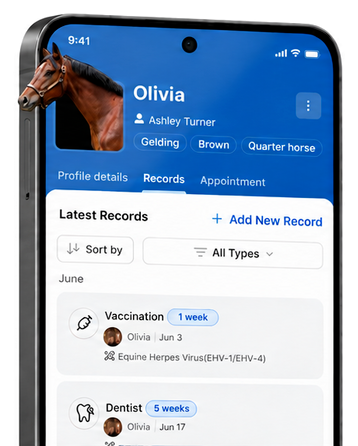
Every horse in EQUINET has its own profile that holds its key details and links it to the people around it.
To add a horse, tap + and choose Horse, enter the horse's name and basic details (such as breed, age and a photo) and link it to the owner or other relevant contacts. You can also add a horse directly from a contact's page, or create one on the spot while logging a horse entry with + New Horse.
Once a horse is linked, every entry, appointment and invoice you record for it builds up in its profile, so you and your care team can see the complete history of the horse in one place.
With Voice Auto-Fill you can also describe a job out loud and EQUINET will pick the horse, procedures and notes for you, so keeping horse profiles up to date pays off. On EQUINET Core you can own one horse and look after an unlimited number of horses for other people. Care, Premium and Business let you own more.
To add a horse, tap + and choose Horse, enter the horse's name and basic details (such as breed, age and a photo) and link it to the owner or other relevant contacts. You can also add a horse directly from a contact's page, or create one on the spot while logging a horse entry with + New Horse.
Once a horse is linked, every entry, appointment and invoice you record for it builds up in its profile, so you and your care team can see the complete history of the horse in one place.
With Voice Auto-Fill you can also describe a job out loud and EQUINET will pick the horse, procedures and notes for you, so keeping horse profiles up to date pays off. On EQUINET Core you can own one horse and look after an unlimited number of horses for other people. Care, Premium and Business let you own more.
You do not need an accounting provider to invoice in EQUINET. The built-in invoicing lets you create, send and manage every invoice from one place and export them as CSV for your bookkeeper, with up to 5 invoices a month on Core and Care, and unlimited invoices on Premium and Business.
If you’re on Premium or Business and already run your books in Xero or QuickBooks, you can connect them instead so invoices are created there: open Settings, go to the Invoicing and Administration section, choose Connect to provider, pick Xero or QuickBooks and sign in with your existing login (if you do not have an account yet you will be guided to create one). Two things to keep in mind: QuickBooks works with prices entered tax excluded, while EQUINET invoicing and Xero accept prices with or without tax; and you can disconnect a provider at any time to switch to the other provider or back to EQUINET's own invoicing.
If you’re on Premium or Business and already run your books in Xero or QuickBooks, you can connect them instead so invoices are created there: open Settings, go to the Invoicing and Administration section, choose Connect to provider, pick Xero or QuickBooks and sign in with your existing login (if you do not have an account yet you will be guided to create one). Two things to keep in mind: QuickBooks works with prices entered tax excluded, while EQUINET invoicing and Xero accept prices with or without tax; and you can disconnect a provider at any time to switch to the other provider or back to EQUINET's own invoicing.
Your services or procedures (for example full shoeing, trim, resets or a pad) are the building blocks of every horse entry and invoice, so set them up first.
Open Settings, go to Invoicing and Administration and choose Configure Procedures, then tap + Add Procedure and enter the category, name, description and price.
Keep the Available toggle on so the procedure shows up when you log a job.
Enter prices the same way you will invoice them: tax included or tax excluded both work with EQUINET invoicing and Xero, while QuickBooks requires tax-excluded prices.
Procedures cannot be deleted once they have been used on an invoice, but you can edit them or switch the Available toggle off to hide them.
A clear, consistent procedure list also helps Voice Auto-Fill: when you describe a job out loud, EQUINET matches what you said to your procedures and fills in the entry for you.
Open Settings, go to Invoicing and Administration and choose Configure Procedures, then tap + Add Procedure and enter the category, name, description and price.
Keep the Available toggle on so the procedure shows up when you log a job.
Enter prices the same way you will invoice them: tax included or tax excluded both work with EQUINET invoicing and Xero, while QuickBooks requires tax-excluded prices.
Procedures cannot be deleted once they have been used on an invoice, but you can edit them or switch the Available toggle off to hide them.
A clear, consistent procedure list also helps Voice Auto-Fill: when you describe a job out loud, EQUINET matches what you said to your procedures and fills in the entry for you.
Inventory is your digital stock room for shoes, nails, rasps and any other product you carry on the truck, and it is worth setting up on day one.
Open Inventory, tap + Add new product, pick a category (shoes, nails, rasps or custom), choose the brand and product from the catalogue of popular farrier products (Mustad and other brands), then set the type, size and quantity. If a product is not in the catalogue, add it as a custom product with its own name and quantity.
Count shoes per shoe (a pair is 2, a set is 4) and nails as the total in the box (for example 250). Once your stock is in, EQUINET keeps it working for you: low-stock alerts warn you before you run out, products you use in a horse entry can be deducted from stock, you can build a shopping list from what is running low and share it directly with your dealer, and when the order arrives you add it back to inventory from the shopping list. Inventory management and shopping lists are included on EQUINET Core.
Open Inventory, tap + Add new product, pick a category (shoes, nails, rasps or custom), choose the brand and product from the catalogue of popular farrier products (Mustad and other brands), then set the type, size and quantity. If a product is not in the catalogue, add it as a custom product with its own name and quantity.
Count shoes per shoe (a pair is 2, a set is 4) and nails as the total in the box (for example 250). Once your stock is in, EQUINET keeps it working for you: low-stock alerts warn you before you run out, products you use in a horse entry can be deducted from stock, you can build a shopping list from what is running low and share it directly with your dealer, and when the order arrives you add it back to inventory from the shopping list. Inventory management and shopping lists are included on EQUINET Core.
Watch a Step-by-step Video Tutorial
Prefer to see it rather than read it? Watch the EQUINET setup walkthrough on the EQUINET YouTube channel. It takes you through signing in, importing contacts, adding horses, setting up procedures and inventory, and creating your first invoice.
Get started with EQUINET today
Free download for iOS and Android. One account across every device.